> For the complete documentation index, see [llms.txt](https://help.aranet.com/llms.txt). Markdown versions of documentation pages are available by appending `.md` to page URLs; this page is available as [Markdown](https://help.aranet.com/aranet4/aranet4-home/usage-and-measurements/calibration-and-errors.md).
# Calibration & Errors
## Calibration process
The Aranet4 can be calibrated either automatically or manually at home.
{% hint style="success" %}
Please redo the calibration for Aranet4 sensors once per year, as the sensor measurement values will start to drift over time.
{% endhint %}
Out of the box, brand-new sensors have the factory calibration, and for some time there is no need to do it; measurements will be precise just by putting in the batteries and pairing the sensor with the Aranet Home app.
In the case of automatic calibration mode, the Aranet4 device will use the lowest ppm data from approximately 8 hours of the lowest measurements during each 30-day operation period. If the lowest recorded measurement was 460 ppm, then this will be considered 420 ppm.
{% hint style="warning" %}
In automatic calibration, the deviation might vary.
{% endhint %}
### Prerequisites
When doing a **manual** calibration, the Aranet4 device must be:
* Exposed to fresh air (about 420 ppm of CO₂) and the environment should be stable (not changing) for 30 minutes while the calibration is done.
* Maintain a distance of at least 1 meter from the device during the calibration process so the CO₂ from your breath won’t impede the calibration.
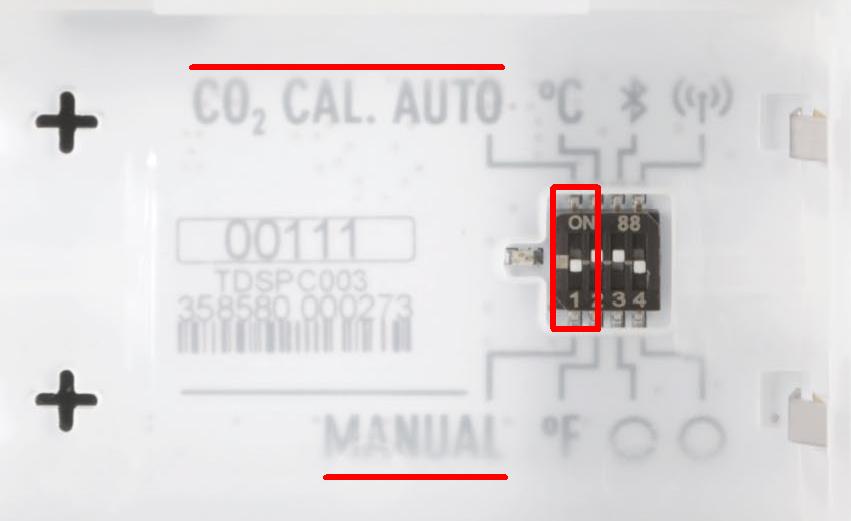
* To initiate the manual CO₂ calibration, change the switch position at the back of the device behind the batteries from MANUAL to AUTO and back to MANUAL (maintain a maximum of 1 second between each movement):
{% columns %}
{% column width="41.66666666666667%" valign="middle" %}
{% hint style="info" %}
The batteries must be inserted into the device. To trigger the switch, use the SIM tool delivered with Aranet4 or another similar tool.
{% endhint %}
{% endcolumn %}
{% column width="58.33333333333333%" %}
{% endcolumn %}
{% endcolumns %}
The calibration progress will be displayed on the screen of the device. In case of a calibration failure message, make sure that the environmental requirements are met and repeat the process from the beginning.
Manual calibration can be done using the Aranet Home app as well. You can see the instructions on how to do the manual calibration via the app.
For reference background CO₂ level, please check the [global outdoor CO₂ level map](https://earth.nullschool.net/#current/chem/surface/level/overlay=co2sc/orthographic=29.16,51.27,791/loc=24.215,57.021):\
Click with the mouse pointer on your location on the map, and you will see the current CO₂ level outdoors.
## Calibration errors
{% hint style="warning" %}
Removing the batteries erases the measurement history stored on the device. Before you take out the batteries, open the Aranet Home app and let it sync, so the history is kept in the app.
{% endhint %}
### Unexpected error
Remove the batteries for 15 minutes and try the calibration again. If the calibration is still not possible and an error is still shown on the screen of the device, then please proceed with the [RMA](https://rma.aranet.com/) process.
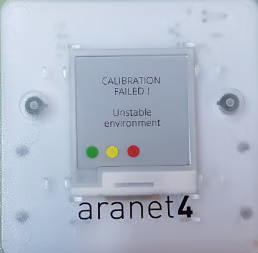
### Calibration failed, unstable environment
{% columns %}
{% column valign="middle" %}
The error message "Calibration failed, unstable environment" means that during the calibration process of the Aranet4 device, the CO₂ concentration level changes in the surrounding air were too large for the device to correctly set the 420 ppm calibration baseline.
{% endcolumn %}
{% column %}
{% endcolumn %}
{% endcolumns %}
To restore the device's operation of the device and obtain a successful and correct calibration result, please try:
1. Take out the batteries of the Aranet4 device.
2. Put the batteries in the correct orientation again inside the device (both batteries in the same direction with the + pole on the left side).
3. Restart the phone where the Aranet Home application is installed.
4. Try the calibration again. Remember that it is better to put the sensor, if possible, in an outdoor environment during the calibration process for 15 minutes without any person nearby.
If the calibration is still not possible and an error is still shown on the screen of the device, then please proceed with the [RMA](https://rma.aranet.com/) process.
### Other error messages
There are three kinds of error messages that can appear on the screen of the device:
| Error code | Cause | Solution |
| ----------------------- | ------------------------------------------------------------------------------------------------------------------------------------------------------------------------------------------------------------------------------------------------- | ---------------------------------------------------------------------------------------------------------------------------------------------------------------------------------------------------------------------------------------------------- |
| 0x8001 – 0x8005 | The CO₂ sensor is damaged | Fill out the [RMA form](https://rma.aranet.com/) |
| 0x8106, 0x800E – 0xFFFE | CO₂ sensor malfunction or CO₂ measurement is out of range, caused by:
- Excessive CO₂ concentration near the device
- Excessive moisture near the device
-Incorrect calibration of CO₂ sensor
- Damaged CO₂ sensor
| 1. Let the Aranet4 device dry completely
2. Manually recalibrate the CO₂ sensor
3. If the problem persists, fill out the RMA form
|
| 0ppm or 9999ppm | The CO₂ sensor is misadjusted or damaged | 1. Manually recalibrate the CO₂ sensor
2. If the problem persists, fill out the RMA form
|
---
# Agent Instructions
This documentation is published with GitBook. GitBook is the documentation platform designed so that both humans and AI agents can read, navigate, and reason over technical content effectively. Learn more at gitbook.com.
## Querying This Documentation
If you need additional information that is not directly available in this page, you can query the documentation by asking a question.
Perform an HTTP GET request on the following URL with the `ask` and `goal` query parameters:
```
GET https://help.aranet.com/aranet4/aranet4-home/usage-and-measurements/calibration-and-errors.md?ask=&goal=
```
`ask` is the immediate question: it should be specific, self-contained, and written in natural language.
`goal` is what the user is ultimately trying to achieve, the reason they need the answer. Sharing it helps GitBook give you a better, more relevant answer. A goal is most helpful when it describes the outcome the user wants rather than restating the question. For example, with `ask=how do I create an API token`, a goal like `automate deployments from our CI pipeline` lets GitBook tailor the answer to that use case.
The response will contain a direct answer to the question and relevant excerpts and sources from the documentation.
Use this mechanism when the answer is not explicitly present in the current page, you need clarification or additional context, or you want to retrieve related documentation sections.