> For the complete documentation index, see [llms.txt](https://help.aranet.com/llms.txt). Markdown versions of documentation pages are available by appending `.md` to page URLs; this page is available as [Markdown](https://help.aranet.com/aranet-cloud-page/aranet-cloud-landing-page/base-management/connect-base-station.md).
# Connect Base Station
Aranet Pro base can be connected to Aranet Cloud by registering it to the Workspace. The Aranet Cloud Workspace creation process is described in this topic: [Create Workspace](/aranet-cloud-page/aranet-cloud-landing-page/workspace-management/create-workspace.md)
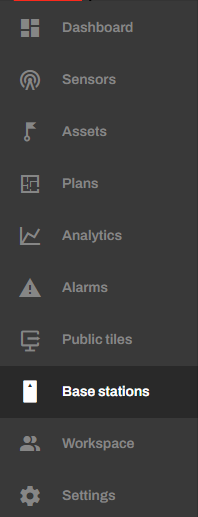
**If you just created a new Workspace,** go to Base stations and press the **ADD BASE STATION** button:
#### **Registering a new Aranet Pro base to the existing WORKSPACE**
1. Log in with your credentials to Aranet Cloud and select the **WORKSPACE** to which you wish to add a new Aranet Pro base (you should have *Administrator* or *Owner* rights).
2. Navigate to the **Base stations** tab.
3. Click on the **NEW BASE STATION** button.
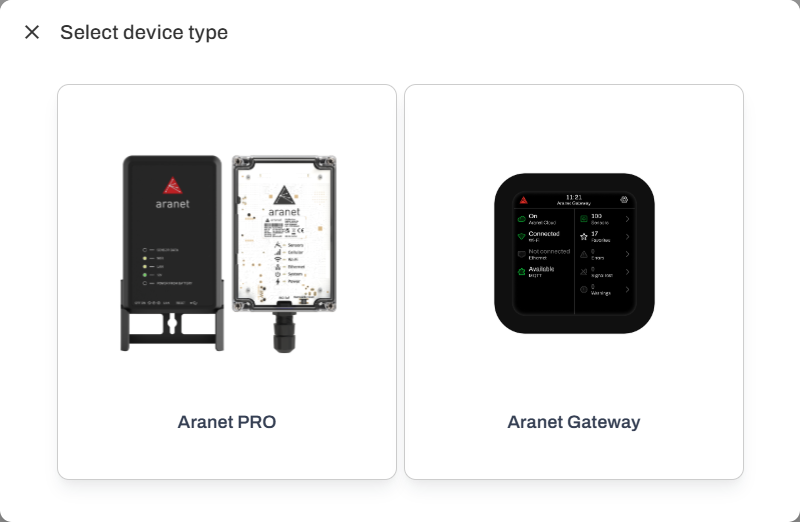
4. Choose device type "Aranet Pro"
There are two ways to connect a base station to Cloud.
1. The Cloud to Base way or remote registration (Only from Base station FW 4.5.0)
2. The Base to Cloud way
#### **The Cloud to Base way or remote registration.**
To register the base station remotely, you first have to go to the Cloud workspace you want to add the base station to and click on the Base stations tab.\
Afterward, you can click on the **NEW BASE STATION BUTTON,** and a new screen will pop up:
From here, you have to enter the base's serial number and the default WiFi SSID. If you have the PRO+ line of base stations (white), it will have a sticker on the front, behind the glass of the info.
If you have the regular PRO model (black) base station, the sticker with the serial number is on the back. But the WiFi SSID is only visible if the base station is plugged in and you have a device that can see WiFi signals. You should use the default Wi-Fi SSID; if it is changed, it will not work.
**!NOTE! The base has to be at least FW 4.5.0**
Afterwards, the base station will show up as pending and can take up to 2 hours after it has an internet connection to connect to the Cloud.
If you are not able to register using this method, you can click on **REGISTER USING BASE STATION UI**.
#### **Base to Cloud registration**
**Aranet PRO base must be connected to the Internet!**
Further, follow the instructions in the new pop-up window:
When the registration code is created on the Aranet Cloud system side, the next user must log in to the Aranet PRO base station WEB graphical user interface, go to the **Aranet Cloud** section, and here enter in the appropriate fields **the same e-mail and registration code** as prompted in the Aranet Cloud message. Then the user must click the button **REGISTER TO THE CLOUD**:
Aranet PRO base will start its paired sensor measurement data upload to the Aranet Cloud platform. The sensor data upload process, depending on sensor data and data connection speeds between the Aranet PRO base station and Aranet Cloud system, can take up to 20 – 30 minutes. During this process, sensor data will gradually appear in the Aranet Cloud workspace.
After successful registration and sensor data upload to the Aranet Cloud workspace, the Aranet PRO base station itself will show the following information in the **Aranet Cloud** section:
**Please NOTE: The Aranet Pro base can be registered to the TRIAL workspace only once! You can not register the same Aranet Pro base to another Trial workspace.**\
---
# Agent Instructions
This documentation is published with GitBook. GitBook is the documentation platform designed so that both humans and AI agents can read, navigate, and reason over technical content effectively. Learn more at gitbook.com.
## Querying This Documentation
If you need additional information that is not directly available in this page, you can query the documentation dynamically by asking a question.
Perform an HTTP GET request on the current page URL with the `ask` query parameter, and the optional `goal` query parameter:
```
GET https://help.aranet.com/aranet-cloud-page/aranet-cloud-landing-page/base-management/connect-base-station.md?ask=&goal=
```
`ask` is the immediate question: it should be specific, self-contained, and written in natural language.
`goal` is optional and describes the broader end goal you are ultimately trying to accomplish on behalf of the user. GitBook uses it to tailor the answer towards what is most useful for that goal.
The response will contain a direct answer to the question and relevant excerpts and sources from the documentation.
Use this mechanism when the answer is not explicitly present in the current page, you need clarification or additional context, or you want to retrieve related documentation sections.